Ideogram 4.6 Precise Edit

Ideogram 4.6 Precise Edit is the precision editing variant of Ideogram 4.6. It applies a natural-language instruction to a source image, optionally limited by a mask and guided by up to four reference images, and returns the result at the source's exact dimensions. It accepts sources up to 8192x8192, and an edit limited to one region keeps a 4K or 8K source at full resolution. It suits retouching, exact color changes, product detail repair, and masked edits.
Masked edits
How to aim an Ideogram 4.6 Precise Edit with a mask: drawing the mask, picking one object out of several, placing something new and printing a reference onto a product.
Introduction
An instruction says what to change. A mask says where to aim it. You pass a black and white image the same size as the source, white over the area to edit, and Ideogram 4.6 Precise Edit aims the instruction there.

Photorealistic hotel lobby photograph: two identical mid-century armchairs upholstered in pale gray boucle with walnut legs stand on a large cream rug, one centered on the left third of the frame and one centered on the right third, facing the camera, with a low round walnut coffee table between them. A warm white wall with a single large round mirror behind them, a tall potted olive tree at the far right edge. Soft daylight, shot straight-on at seated eye level with a 35mm lens, the chairs filling the lower half of the frame.

Change the upholstery of the armchair to rust orange velvet. Keep its shape, its legs and its cushions exactly the same, and keep everything else in the image exactly the same.
The instruction says only "the armchair", so with two identical chairs in the frame, the mask is what picks the right one.
This guide covers drawing the mask, picking one object out of several, placing something new, combining a mask with references, making a mask of your own and when to leave it out.
How the mask works
The mask goes in inputs.maskImage, next to the source in inputs.seedImage:
import { createClient } from '@runware/sdk'

const client = await createClient({ apiKey: process.env.RUNWARE_API_KEY })
await client.connect()

const [result] = await client.run({
  model: 'ideogram:4.6@precise-edit',
  positivePrompt: 'Change the upholstery of the armchair to rust orange velvet. Keep its shape, its legs and its cushions exactly the same, and keep everything else in the image exactly the same.',
  inputs: {
    seedImage: 'https://assets.runware.ai/guides/ideogram-4-6-precise-edit/masked-edits/source-lobby.jpg',
    maskImage: 'https://assets.runware.ai/guides/ideogram-4-6-precise-edit/masked-edits/mask-lobby.png'
  }
})
import asyncio
import os
from runware import Runware
async def main():
async with Runware(api_key=os.environ["RUNWARE_API_KEY"]) as client:
results = await client.run({
"model": "ideogram:4.6@precise-edit",
"positivePrompt": "Change the upholstery of the armchair to rust orange velvet. Keep its shape, its legs and its cushions exactly the same, and keep everything else in the image exactly the same.",
"inputs": {
"seedImage": "https://assets.runware.ai/guides/ideogram-4-6-precise-edit/masked-edits/source-lobby.jpg",
"maskImage": "https://assets.runware.ai/guides/ideogram-4-6-precise-edit/masked-edits/mask-lobby.png"
}
})
asyncio.run(main())curl https://api.runware.ai/v1 \
-H "Authorization: Bearer $RUNWARE_API_KEY" \
-H "Content-Type: application/json" \
-d '[
{
  "taskType": "imageInference",
  "taskUUID": "5a1d8e36-2f74-4c09-b6e3-8c4a7f1d2e95",
  "model": "ideogram:4.6@precise-edit",
  "positivePrompt": "Change the upholstery of the armchair to rust orange velvet. Keep its shape, its legs and its cushions exactly the same, and keep everything else in the image exactly the same.",
  "inputs": {
    "seedImage": "https://assets.runware.ai/guides/ideogram-4-6-precise-edit/masked-edits/source-lobby.jpg",
    "maskImage": "https://assets.runware.ai/guides/ideogram-4-6-precise-edit/masked-edits/mask-lobby.png"
  }
}
]'runware run ideogram:4.6@precise-edit \
positivePrompt="Change the upholstery of the armchair to rust orange velvet. Keep its shape, its legs and its cushions exactly the same, and keep everything else in the image exactly the same." \
inputs.seedImage=https://assets.runware.ai/guides/ideogram-4-6-precise-edit/masked-edits/source-lobby.jpg \
inputs.maskImage=https://assets.runware.ai/guides/ideogram-4-6-precise-edit/masked-edits/mask-lobby.png{
"taskType": "imageInference",
"taskUUID": "5a1d8e36-2f74-4c09-b6e3-8c4a7f1d2e95",
"model": "ideogram:4.6@precise-edit",
"positivePrompt": "Change the upholstery of the armchair to rust orange velvet. Keep its shape, its legs and its cushions exactly the same, and keep everything else in the image exactly the same.",
"inputs": {
"seedImage": "https://assets.runware.ai/guides/ideogram-4-6-precise-edit/masked-edits/source-lobby.jpg",
"maskImage": "https://assets.runware.ai/guides/ideogram-4-6-precise-edit/masked-edits/mask-lobby.png"
}
}Response
[
  {
    "taskType": "imageInference",
    "taskUUID": "5a1d8e36-2f74-4c09-b6e3-8c4a7f1d2e95",
    "imageUUID": "f8b3e1c6-9d42-4a75-8e0f-6b2d4c9a1e37",
    "imageURL": "https://im.runware.ai/image/os/a14d18/ws/2/ii/f8b3e1c6-9d42-4a75-8e0f-6b2d4c9a1e37.jpg"
  }
]
Three rules decide whether it does what you meant:
- White marks the target. The instruction is aimed at what sits under the white area.
- Same size as the source. Draw the mask at the pixel dimensions of
inputs.seedImage, so the white area lands on the object you drew it over. - Generous, not traced. The lobby mask is a rounded rectangle around the whole chair with room to spare, and the instruction finds the chair's edges inside it. The left chair, outside the mask, comes back unchanged.
Picking one object out of several
An instruction names a thing, and a frame with two of that thing is ambiguous. The same instruction on the same lobby, without the mask:
Photorealistic hotel lobby photograph: two identical mid-century armchairs upholstered in pale gray boucle with walnut legs stand on a large cream rug, one centered on the left third of the frame and one centered on the right third, facing the camera, with a low round walnut coffee table between them. A warm white wall with a single large round mirror behind them, a tall potted olive tree at the far right edge. Soft daylight, shot straight-on at seated eye level with a 35mm lens, the chairs filling the lower half of the frame.

Change the upholstery of the armchair to rust orange velvet. Keep its shape, its legs and its cushions exactly the same, and keep everything else in the image exactly the same.
Without the mask the model has to decide which chair "the armchair" means, and it changed both. Rewording ("the armchair on the right") is the other fix, but a mask works the same way whatever the wording, so one instruction runs unchanged across a catalog with a mask drawn per photo.
Placing something new
When the edit adds an object, the mask marks where the object goes. The instruction below only asks for a floor lamp, and the mask puts it in the empty corner.

Photorealistic interior photograph of a reading nook: a mustard yellow velvet armchair stands in the right half of the frame beside a tall window with sheer white curtains, a small stack of books on the floor next to it. The left third of the frame is empty pale oak floor and a plain warm white wall, with nothing standing there. Soft evening light, shot straight-on at standing height with a 35mm lens.

Add a tall brass floor lamp with a white linen drum shade standing on the floor. Keep everything else in the image exactly the same.
Draw the area at the size of the object you want. The lamp fills the white area from the floor to the top of its shade, so the height of the mask is the height of the lamp.
Masks with references
A mask combines with inputs.referenceImages, which is how a reference design lands on an exact spot of a product. With a mask, the request takes up to three references, one fewer than without.

Photorealistic merchandise mockup photograph of a woman in her twenties in a plain white t-shirt and light jeans, standing against a plain light gray studio wall and holding a blank natural canvas tote bag by its handles in front of her at hip height. The front of the bag faces the camera flat and fills the center of the frame, completely blank with no print. Framed from the shoulders to the knees, her face out of frame. Soft even studio light, realistic canvas texture.

Screen print the artwork from the reference image centered on the front of the tote bag, following the texture and the gentle folds of the canvas. Keep everything else in the image exactly the same.
- Reference
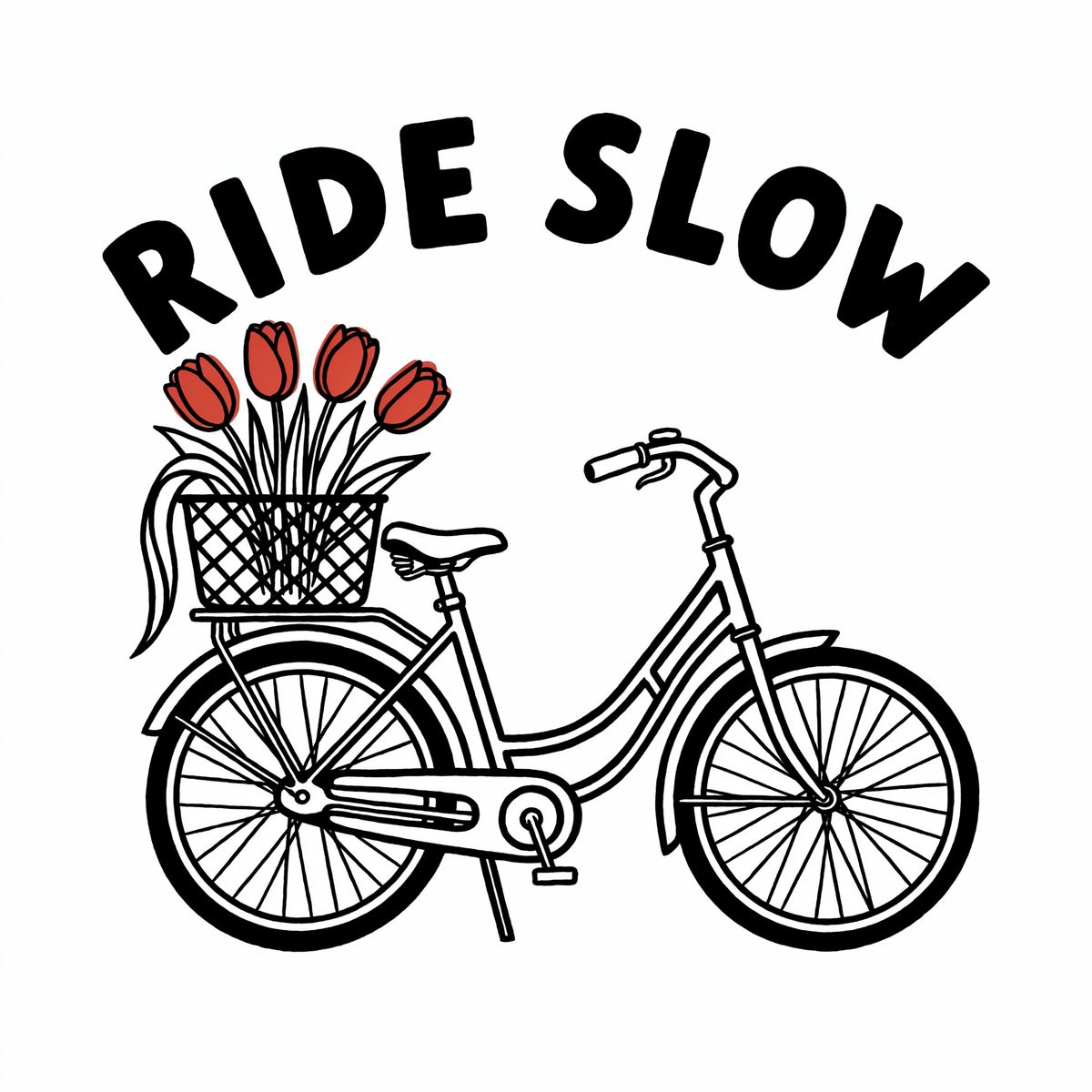
A two-color screen print illustration on a plain white background: a city bicycle with a front basket full of tulips, drawn with bold hand-drawn lines, and the words "RIDE SLOW" in chunky hand-lettered capitals arched above it. Black and tomato red only, flat color, clean edges, centered, no other elements.

The mask decides where the print goes, the reference decides what it looks like, and "following the texture and the gentle folds of the canvas" decides how it sits. For a print-on-demand mockup, one photo of a blank tote serves every customer's artwork.
Making a mask
Drop in your source image, paint over the area you want to change and download the mask. The file comes out white on black at the source's own size, which is the format inputs.maskImage expects.
Drop an image here or browse
For a repeatable pipeline, draw the mask in code instead. A rectangle or a polygon over a known area of a templated shot, such as the front of every tote in a product line, is enough, because the instruction finds the object inside it.
When to leave the mask out
Without a mask, the instruction applies to the whole image. That is the right call for a change meant to touch the whole frame, such as relighting, and for a target that appears only once and is easy to name. See Editing images for edits written that way.
For sources larger than 4096 × 4096, see Region edits.
Tips
-
Paint generously. A rounded rectangle around the whole object is enough, because the instruction finds its edges.
-
Keep naming the target. The mask points at the area, and the instruction still says what changes there.
-
Draw at the source's exact size. The white area has to sit over the object you drew it for.
-
Draw a new object's area at its size. The added lamp filled the white area from floor to shade.
-
Count your references. Three at most with a mask, four without.